

Updating your WordPress site can be scary. One wrong click on an update button can break your layout. It can even turn your screen completely blank. For a business in the UK, a broken site means lost customers and lost money. You might lose hundreds of pounds while your site is offline. Nobody wants that headache on a busy workday.
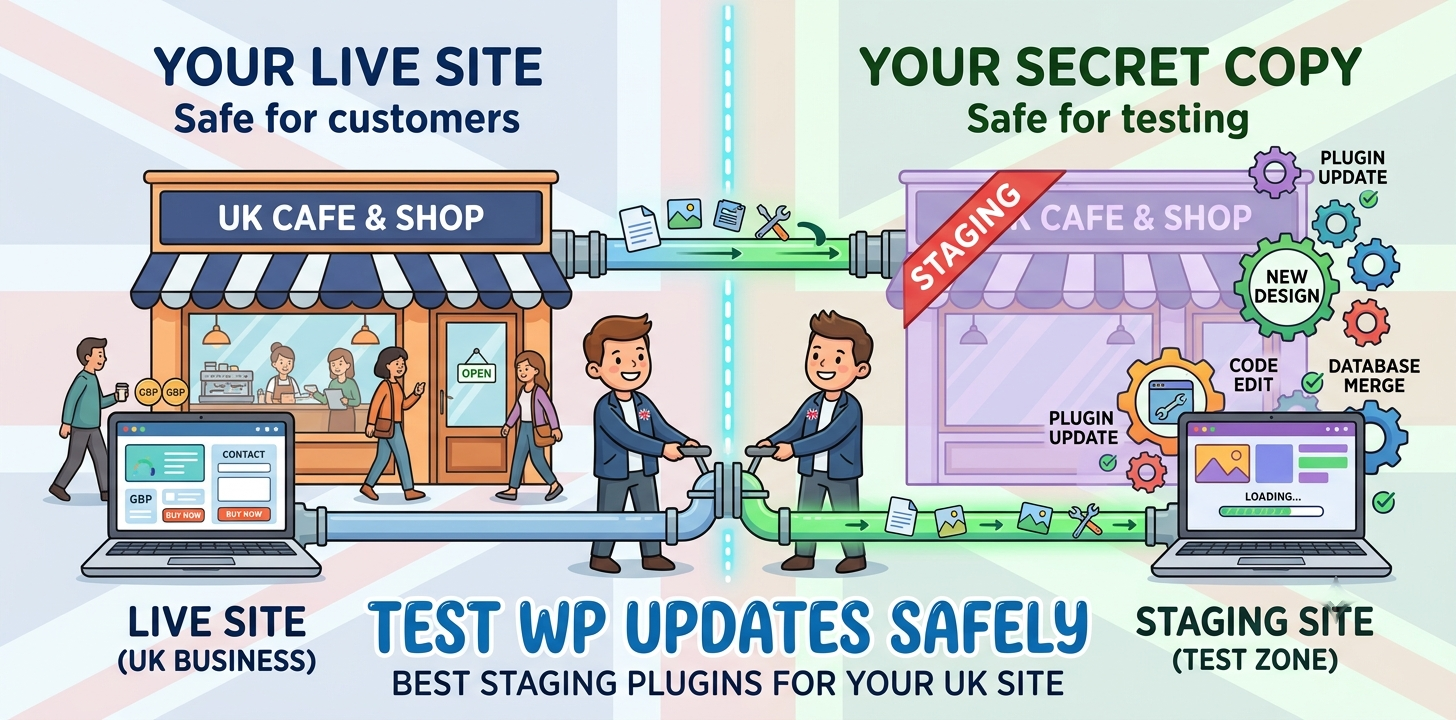
The good news is that you do not have to test new tools on your live site. You can use a WordPress staging plugin instead. A staging plugin makes a secret copy of your website. This hidden copy is called a staging site. You can test updates, try new features, and fix bugs on this hidden copy. Your visitors will only see your main site running smoothly. In this guide, you will learn about the top staging plugins. You will also learn how to pick the right one to keep your site completely safe.
Best WordPress staging plugins for safe site updates
Staging plugins let you build a copy of your site with one click. You can test updates safely before pushing changes back to your real, live website.
WP Staging: Simple and Fast for Beginners
WP Staging is one of the easiest tools to use today. It works right inside your main WordPress dashboard. You do not need to log into your web host or use FTP tools. You just click one big button to make a clone of your site in a few minutes.
Last year, I helped a local bakery in Manchester update their online store. Their main site had over fifty products. They were terrified that a theme update would break their checkout page. We installed WP Staging and made a test clone in under three minutes. We ran all our updates on the test site first. We found two broken plugins and fixed them safely. The live store stayed up the whole time, and the bakery did not lose a single sale.
Here are the main features of WP Staging:
- Fast setup that takes less than five minutes
- Works on most UK web hosting plans
- Keeps your test site hidden from Google search
- Lets you push changes to your live site with the paid version
If you are new to web design, this tool is a great choice. You can read our [related guide on choosing the best UK WordPress hosting] to make sure your server supports fast cloning.
WP Stagecoach: Best for Busy Online Shops
WP Stagecoach is built for sites that change every day, like online stores or busy blogs. Normal staging tools can cause big problems for shops. If a customer buys a shirt on your live site while you are testing, that order data might get wiped out when you push your changes live. WP Stagecoach solves this problem with smart merging.
I used this tool with a UK clothing brand during their big Friday sale. They needed to update their site code, but orders were coming in every minute. WP Stagecoach allowed us to merge only our code changes. It left all new customer orders and user accounts totally untouched on the live database.
Key benefits of using WP Stagecoach:
- Database merging so you do not overwrite new orders
- One-click password protection for your test site
- Offsite storage so the test copy does not fill up your server space
- Easy setup process for beginners
This plugin is ideal for WooCommerce store owners in the UK who cannot afford to lose any order data. To protect your site even further, check out our [related guide on WordPress security tips] for simple steps to stop hackers today.
Duplicator Pro: Ideal for Big Site Upgrades
Duplicator Pro is a powerful plugin made for larger websites and web developers. It does much more than just make a quick test copy. It packs your entire site into a single zip file. You can move this file to a subfolder, a different domain, or even a local server on your computer.
In my work with small UK businesses, I always use Duplicator Pro for major site redesigns. A few months ago, a law firm in London wanted a totally fresh look. We built the new design on a private local test server using Duplicator Pro. Once the client approved the final look, we moved the whole site to their main domain with zero downtime.
Top features of Duplicator Pro:
- Makes full site backups in compressed zip format
- Lets you move your site to new web hosts easily
- Connects to secure cloud storage like Google Drive and Dropbox
- Schedules automated background backups for total peace of mind
If you have a large site with many pages and blog posts, Duplicator Pro gives you complete control over your updates. It is a reliable tool that every web owner should consider.
Frequently Asked Questions
Here are simple answers to the most common questions people ask on Google about WordPress staging sites and keeping your website updates completely safe.
What is a WordPress staging site?
A staging site is a private copy of your website. You use it to test plugin updates and design changes safely without showing any breaks to your live website visitors.
Will a staging site hurt my Google SEO?
No, it will not hurt your SEO if it is hidden. Good staging plugins block search engines automatically so Google does not index your duplicate content or show it in results.
Is a staging site the same as a backup?
No, they are different. A backup is a saved file you restore if your site breaks. A staging site is a live playground where you test changes before applying them.
Conclusion
Updating your WordPress website does not have to be a risky chore. By using a staging plugin, you can test every theme, plugin, and code change in a safe space. This keeps your live site running fast and error-free for all your UK visitors. You will never have to worry about a white screen of death stopping your business sales again.
Here is my top expert tip: always make a full backup of your live site right before you push your staging changes live. Even when a test goes perfectly, having a fresh backup gives you complete safety.
Your next step is simple. Pick one staging plugin from this guide today. Install it on your site and create your very first test clone. Once you see how easy it is, you will never run blind updates on your live site again.