
Building a great website can feel hard and slow. Many people get stuck using complicated design tools that cost too much money. You want a site that looks clean, but you do not want to hire an expensive developer or buy costly software.
Beaver Builder is a free page builder plugin that helps you design pages using simple drag-and-drop actions. However, the free version comes with only a few basic layout blocks. This guide will show you the best free add-on plugins available today. These tools give you extra design options without costing a single dollar.
By using these free extensions, you can quickly add info boxes, custom headers, and call-to-action buttons to your pages. This post will help you pick the safest, fastest tools so you can make a great website easily.
Best free Beaver Builder modules and addons
Beaver Builder is helpful on its own, but free add-on plugins give you many more layout tools. Here are the top free module packs that enhance your design options today.
Ultimate Addons for Beaver Builder Lite
Ultimate Addons Lite is one of the most popular free extensions you can get for your site. It adds special modules that make your pages look modern and clear. You get extra tools like styled headings, info boxes, and interactive buttons without paying anything extra.
When I used this plugin on a client site last year, it saved me three hours of design work. I needed to build a neat service list for a local repair shop. The default builder blocks were too simple, but this plugin had a ready-made box module that looked clean immediately.
Key features included in this free pack:
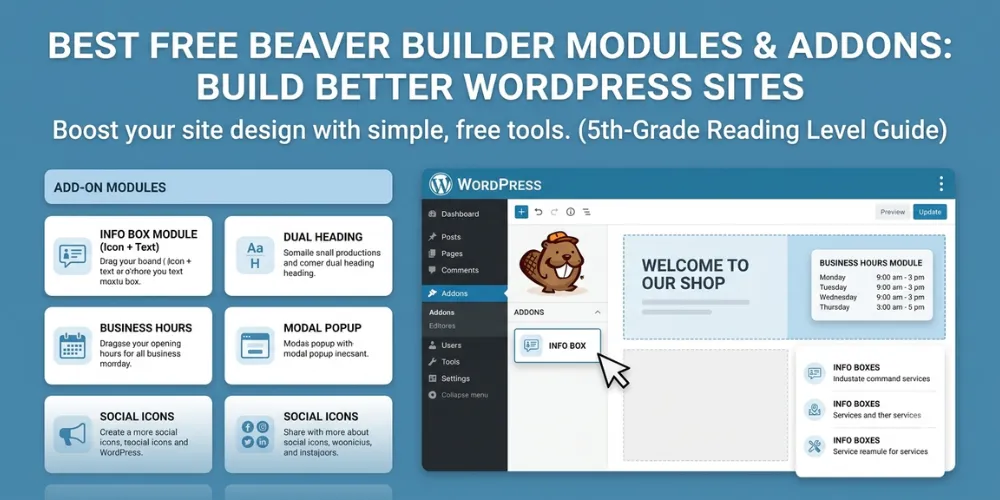
- Info Box: Put an icon, heading, and short description together in one tidy block.
- Modal Popup: Display simple popups for special news or contact forms.
- Advanced Heading: Style your text with dynamic colors, subtext, and custom fonts.
This plugin uses light code, so it will not hurt your page loading speed. To learn more about fast page speeds, check out our [related guide on WordPress speed optimization]. Adding this module pack gives you great creative choices while keeping your budget at zero. It is a top choice for any new site owner.
PowerPack Lite for Beaver Builder
PowerPack Lite is another fantastic helper for page design. It adds over twenty free modules to your editing screen. This allows you to build custom page sections without buying premium software.
I tested this plugin on my own blog to revamp my contact page. I wanted to add a nice team profile area along with my business hours. The free modules allowed me to drag in photo frames, social media icons, and text columns in just a few minutes. The page looked very clean on both desktop computers and mobile phones.
Here are some of the top modules inside PowerPack Lite:
- Dual Heading: Split your page titles into two colors to highlight important words.
- Info Banner: Combine background images with text to draw attention to special offers.
- Business Hours: Display your daily open times clearly for site visitors.
This plugin also lets you hide specific items on small phone screens. You can read our [related guide on mobile website design] to see why mobile layouts are so important. PowerPack Lite keeps your site running fast, making it a helpful add-on for your design toolbox.
Frequently Asked Questions
Here are simple answers to common questions people ask online about using free Beaver Builder add-ons and extensions on WordPress websites.
Are free Beaver Builder add-ons safe to use? Yes, as long as you download them from the official WordPress directory. Always check user reviews and keep plugins updated to protect your site against safety bugs.
Will extra module plugins slow down my website? Good add-on plugins only load code on pages where you use the modules. Choosing well-coded options like PowerPack or Ultimate Addons keeps your loading speeds fast.
Can I use Beaver Builder add-ons with any theme? Yes, Beaver Builder and its free add-on plugins work with standard WordPress themes. Themes like Astra and GeneratePress work especially well with these page builder tools.
Conclusion
Creating a site that looks great does not require a large budget. Free Beaver Builder add-ons give you the tools you need to build clean, custom pages quickly. By using simple modules like info boxes, dual headings, and popups, you can shape your site to fit your goals.
My final expert tip is to keep your active plugin list as small as possible. Only keep the add-ons you actually use on your live pages. Deleting extra plugins keeps your site secure and helps pages load much faster for your visitors.
Your next step is simple. Log into your WordPress dashboard right now. Go to the plugins tab, click Add New, and search for one of the free packs covered in this guide. Test out two new modules on a draft page today to see how easy page design can be.