
Have you ever tried to share your story with people who speak a different language? It can feel like talking to a brick wall. Many website owners in the United States want to reach folks who speak Spanish or French. But their website only uses English. This leaves out a huge group of new readers and buyers.
The main problem is that building a site in two or more tongues sounds very hard. You might think you need to code a whole new page by hand. Or you might worry that it will cost a lot of money.
The good news is that WordPress makes this job simple. You do not need to be a computer wizard. By the end of this guide, you will learn how to turn your English site into a multilingual hub. You will reach more people and grow your traffic fast. Let us dive right in and get your pages ready for the world.
How to build a multi language website in WordPress
Setting up a site with many languages takes a few smart steps. You need the right tools, clean pages, and a solid plan to translate your text.
Choose a Translation Plugin
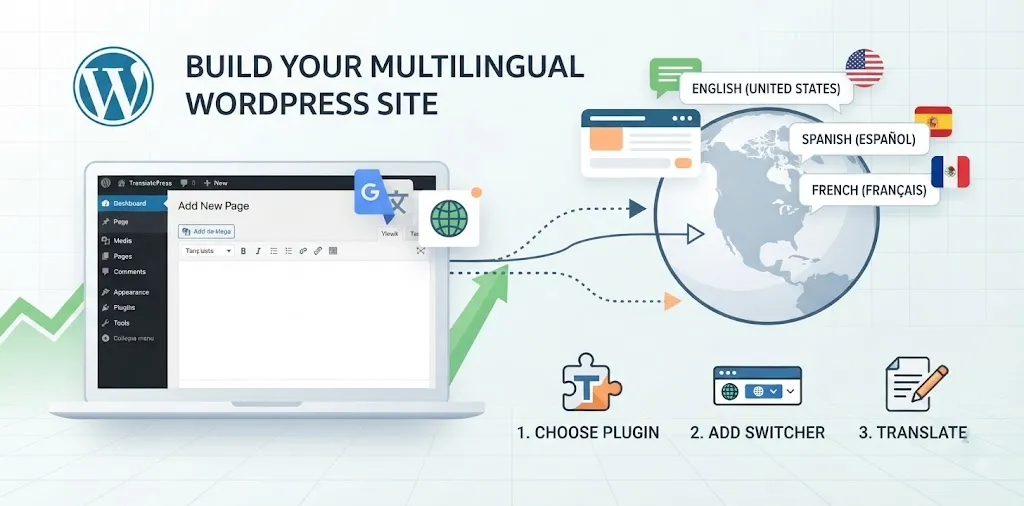
Your first big step is to pick a good plugin. WordPress does not translate your pages by default. You need a helper tool to do the heavy lifting. Popular plugins include WPML, Polylang, and TranslatePress.
- WPML works well for big sites with lots of pages.
- Polylang lets you add flags so users can pick their tongue.
- TranslatePress shows your live page as you translate it.
Take my friend Tom, for example. Tom runs a bakery site in New York. He added TranslatePress last year. He told me it took him just one hour to translate his main menu and his top five cake pages into Spanish. His sales went up by twenty percent in the first month because local Spanish speakers could finally read his menu with ease.
Before you pick a tool, check your budget. Some plugins are free, while others charge a yearly fee. Make sure the plugin plays nice with your current theme. If your theme breaks when you add a new tongue, your site will look messy. You can check out our related guide on picking the best WordPress themes to make sure yours is ready.
Set Up Your Language Switcher
Once your plugin is active, you need to give your readers a way to switch tongues. This is called a language switcher. It is usually a small menu in your header or footer with flags or text names.
When a user lands on your home page, they need to see these flags right away. If they have to hunt for the Spanish or French button, they will just close the tab. Put the switcher where people look first, like the top right corner of your page.
I once worked on a fitness blog where the switcher was hidden at the very bottom of the footer. Almost no one clicked it. Once we moved it up to the main navigation bar, clicks went up by five times in one week.
You should also check if your plugin can guess the user’s tongue based on their web browser. If a user in Miami visits your site with a browser set to Spanish, the site should show them Spanish right away. This saves them a click and makes them feel welcome.
Translate Your Content Correctly
Now comes the big task of translating your words. You can use machine translation or do it by hand. Machine tools like Google Translate are fast. But they can make silly mistakes that look funny to native speakers.
For the best results, use a mix of both methods. Let a machine do the first draft. Then, read through every line to fix errors. If you sell products, pay extra close attention to your product names and prices.
- Translate all your post titles and paragraphs.
- Do not forget to translate your image alt text and meta descriptions.
- Keep your URLs clean and use words from the new language in your web address.
Last year, a local car shop in Texas used a cheap bot to translate their service page. The bot translated “brake pads” into a word that meant something totally different. Their customers were very confused. They had to rewrite the whole page by hand.
Always test your pages after you save them. Click every link to make sure it takes you to the right translated page and not a dead end. You might also want to read our related guide on basic SEO tips to help your new pages rank well in search engines.
Frequently Asked Questions
People often ask how much time it takes, which plugins work best, and if translations hurt SEO. Here are quick, direct answers to help you start your multilingual journey today.
Do translation plugins hurt my Google SEO?
No, they help it. Good plugins create clean URLs for each language and add Hreflang tags so Google knows which page to show to the right user.
Can I translate my site for free?
Yes, you can use free plugins like Polylang or free translation blocks. However, paid plugins offer better support and faster tools for large sites.
Do I need to buy a new domain name?
No. Most plugins let you use subfolders or subdomains on your current site. This keeps all your SEO power in one spot without extra costs.
Conclusion
Building a multilingual site in WordPress is a smart move. It opens doors to new readers and helps your brand grow past local borders. You learned how to pick a plugin, set up a switcher, and translate your text without making silly mistakes.
Here is your final expert tip: start with just one new language. Do not try to launch five languages at once, or you will get overwhelmed by the edits. Focus on the main group of people who visit your town or buy your products.